
AI-Powered GitHub Repository Recommender
Overview
GitRec is a browser extension designed to enhance the GitHub experience by recommending repositories based on a user’s starred projects. It serves as a discovery tool for developers seeking new open-source projects that align with their interests. By analyzing patterns in starred repositories, GitRec offers personalized suggestions, helping users explore relevant codebases, libraries, and tools. This functionality is particularly useful for developers who want to stay updated with trending or complementary projects in their domain.
The tool is built for professionals and hobbyists in software development who frequently navigate GitHub. It supports users across multiple platforms, including Windows, Mac, and Linux, ensuring broad accessibility. As an open-source project hosted on GitHub, GitRec promotes transparency and community-driven development. The backend and frontend components are publicly available, allowing developers to inspect, contribute, or deploy the system independently.
Real-world usage includes identifying new frameworks, discovering tools used by similar projects, or finding repositories with overlapping functionality. The extension operates directly within the browser, integrating seamlessly into the GitHub interface without requiring additional setup beyond installation.
Key Features & Capabilities
- Personalized Repository Recommendations – Analyzes a user’s starred repositories to suggest similar or related projects based on content, tags, and usage patterns.
- Similarity Detection for Popular Repositories – Identifies repositories with comparable features, code structure, or community activity to well-known projects.
- Open-Source Backend and Frontend – Both the extension and its recommendation engine are publicly available, enabling transparency, auditing, and customization.
- Browser-Based Integration – Works directly within the user’s web browser on GitHub, requiring no standalone application or complex configuration.
- Lightweight Design – With a file size of 2.4 MB, the extension is optimized for minimal impact on browser performance and load times.
These features enable developers to streamline their workflow by reducing the time spent searching for relevant code. For example, a user who frequently stars machine learning libraries may receive recommendations for new tools in that domain. Similarly, a developer working with a popular repository can find alternative implementations or forks with similar goals. The open-source nature allows advanced users to verify recommendations or extend functionality.
User Interface, Workflow & Performance
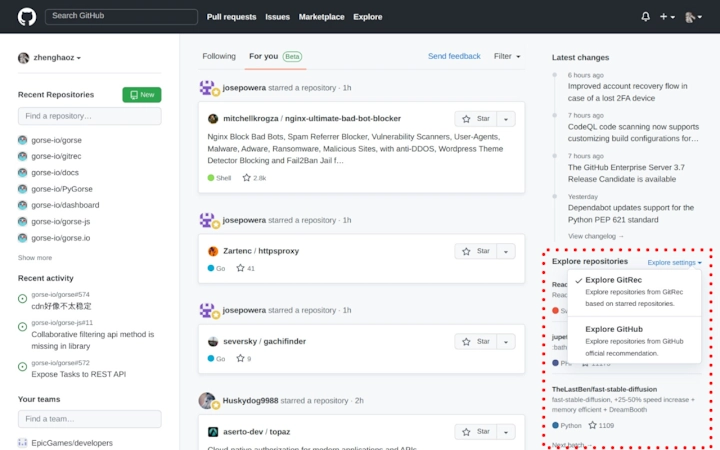
GitRec integrates directly into the GitHub interface, displaying recommendations alongside the user’s profile or repository pages. The UI is minimal and non-intrusive, designed to complement the existing layout without disrupting navigation. Users can access suggested repositories through a dedicated panel or inline cards, depending on the browser and extension version.
Navigation is straightforward: once installed, the extension automatically begins analyzing the user’s starred repositories and presents suggestions in real time. The workflow is passive—no manual input is required beyond initial installation. Users can review, explore, or dismiss recommendations without altering their existing GitHub behavior.
The developer did not specify resource usage details. Performance observations are based on general software behavior patterns. Given the lightweight file size of 2.4 MB and browser-based execution, the extension is expected to operate efficiently across modern systems. Stability is likely maintained through regular updates, though specific release notes were not provided.
Compatibility & System Requirements
GitRec is compatible with Windows, Mac, and Linux operating systems. It functions as a browser extension, meaning it requires a modern web browser such as Chrome, Firefox, or Edge. The extension is designed to work with the GitHub website, making it platform-agnostic in terms of OS support.
Installation size is 2.4 MB, which is minimal for a browser extension. The developer did not provide additional system requirements. Exact performance details were not specified. Compatibility information was partially provided, with no mention of specific browser versions or hardware specifications.
Pros and Cons
Pros
- Open-source with transparent code and recommendation logic
- Personalized recommendations based on user’s starred repositories
- Lightweight at only 2.4 MB
- Works across Windows, Mac, and Linux
- Seamless integration into GitHub without additional setup
Cons
- No information on real-time update frequency for recommendations
- Dependent on browser compatibility and extension policies
- Recommendation quality may vary based on user’s starred repository diversity
- Limited to GitHub ecosystem; not usable outside the platform
- No offline mode or standalone desktop version available
FAQ Section
Is GitRec available for all major browsers?
GitRec is designed to work with modern web browsers, including Chrome, Firefox, and Edge. Specific browser compatibility details were not provided by the developer.
Is the software secure to use?
As an open-source project hosted on GitHub, GitRec allows users to inspect the code for potential security issues. The extension operates within the browser and does not transmit personal data unless explicitly configured.
How often are recommendations updated?
The update frequency for recommendations was not specified. Updates likely occur after changes to the user’s starred repositories or periodic backend recalculations.
What license does GitRec use?
The project is open-source, but the specific license type was not listed in the provided information.
Can I use GitRec offline?
GitRec requires an active connection to GitHub and its backend services to generate recommendations. It does not support offline usage at this time.
Final Thoughts
GitRec offers a smart, lightweight solution for developers seeking to expand their code discovery experience on GitHub. Its AI-powered recommendation engine, combined with open-source transparency, makes it a trustworthy tool for professionals and enthusiasts alike. The ability to suggest repositories based on user behavior adds real value to daily workflows, reducing the effort required to find relevant projects.
While it lacks a standalone desktop application and offline functionality, its browser-based design ensures broad accessibility and minimal overhead. For users deeply involved in open-source development, GitRec is a practical addition to their toolkit.
Download GitRec now and enhance your GitHub exploration with intelligent, personalized recommendations.







